VPN App Screenshots Should Explain the Product Before You Install
A user-friendly guide to reading VPN App Store screenshots and spotting useful details like public Wi-Fi protection and clear usage.
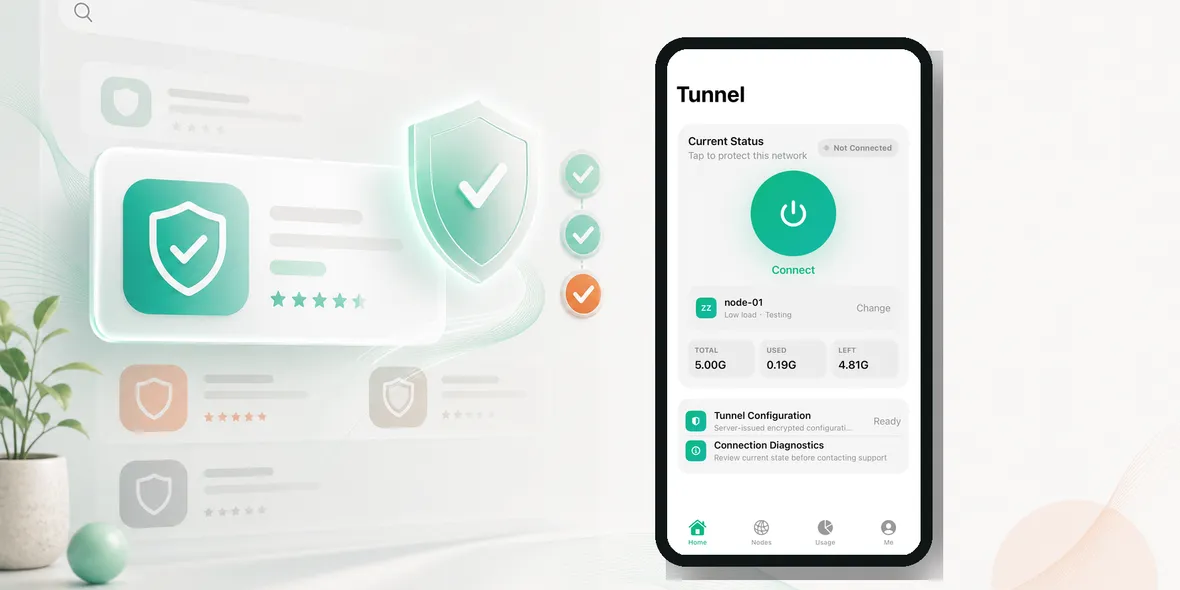
What should VPN App Store screenshots tell you before you install?
The App Store and online ads can make VPN choices feel noisy. Many apps use similar words, so the helpful details are easy to miss.
What should VPN App Store screenshots tell you before you install?
Start With The User Need
Do not start by asking which VPN sounds the most powerful. Start by asking what you need it for.
For many iPhone users, the answer is ordinary: airport Wi-Fi, hotel Wi-Fi, cafe Wi-Fi, campus Wi-Fi, train station Wi-Fi, shared office Wi-Fi, or travel browsing. If the app does not explain those normal situations clearly, it may not be the easiest fit.
What To Check On The App Page
Before installing, look for:
- Look for real UI
- Check whether usage is visible
- Look for public Wi-Fi scenes
- Read local-language privacy wording
- Avoid screenshots that only show slogans
This does not take long. A good VPN should become clearer as you read, not more confusing.
Red Flags
Pause if you see:
- trusting fake interfaces
- missing data collection details
- believing every privacy word
- ignoring local language clarity
- choosing apps that promise content unlocking first
Be especially careful with claims that make a VPN sound like it controls every part of privacy. A VPN helps protect the connection layer, but it does not stop phishing, fake websites, weak passwords, or app-level data collection.
Why Real Screenshots Matter
Screenshots should show the actual product experience: connection status, locations, usage, settings, or support paths. If screenshots only show slogans, users cannot tell how the app works.
For Sovatun-style positioning, the strongest screenshots are practical: connect button, current status, official node/location, usage cycle, remaining traffic, and simple settings.
Privacy Wording To Look For
Specific data language is better than vague privacy language. Sovatun does not collect browsing history, visited URLs, DNS query details, or raw traffic content.
That kind of sentence helps users understand the boundary. It is much clearer than saying a product makes you completely anonymous.
A Simple Decision Rule
If you cannot understand what a VPN does in one minute, keep looking. If the app explains public Wi-Fi use, shows real interface details, gives clear data boundaries, and avoids hype, it is easier to trust.
Where Sovatun Fits
Sovatun is positioned as a simple iPhone VPN for public Wi-Fi and travel, with official locations and clear usage. That is the kind of focused product many users can understand quickly.
See how Sovatun is built around real public Wi-Fi use and clear usage.
Takeaway
Good VPN discovery should not depend on dramatic claims. Users need plain language, real screenshots, clear usage, and honest privacy boundaries.
A Simple Comparison Method
When comparing VPN apps, do not start with the loudest claim. Start with the most useful proof. For “What VPN App Screenshots Should Tell You Before You Install”, that means checking whether the app explains itself clearly before asking for trust.
Use this quick comparison method:
- Does the screenshot show the real product?
- Does the copy mention a real use case like public Wi-Fi, hotel Wi-Fi, airport Wi-Fi, or travel?
- Does the privacy wording say what is not collected?
- Does the app avoid bypass and unlock language?
- Does it show usage, status, or official locations clearly?
A product that answers these questions well will usually feel more trustworthy than a product built only around speed and anonymity slogans.
Why This Matters For European Users
European users are often familiar with VPNs, but they also pay attention to privacy wording, data handling, and brand credibility. Generic claims are easy to ignore. Clear explanations stand out.
That is why Sovatun should not compete by pretending to be the biggest VPN in the market. It should compete by being easy to understand: simple iPhone setup, official locations, visible usage, and honest privacy boundaries.
What A Good App Page Should Make Obvious
A user should understand the product before installing it. They should see that Sovatun is for public Wi-Fi and travel, not for bypass promises. They should see real UI, clear usage, and direct language about data collection.
That creates trust before the first tap.
Localization Should Change Emphasis, Not The Truth
Localization is not only translation. German screenshots can lean into privacy and transparency. French screenshots can emphasize safety and simplicity. Spanish and Italian screenshots can use travel, hotel Wi-Fi, cafe Wi-Fi, and family use. Dutch and Swedish screenshots can stay clean, direct, and practical.
The core claim should stay the same across languages. Sovatun should not become more exaggerated in one market just because the wording sounds better.
Screenshot Text Ideas
Good screenshot titles could include:
- One-tap Wi-Fi protection
- Official locations, clear usage
- Private tunnel for public Wi-Fi
- See what you used
- Simple iPhone VPN for travel
These lines are concrete. They tell the user what the app does without claiming that a VPN solves every privacy problem.