How To Set Up A Simple iPhone VPN In One Tap
A plain-language setup guide for iPhone users who want a simple VPN connection with Sovatun.
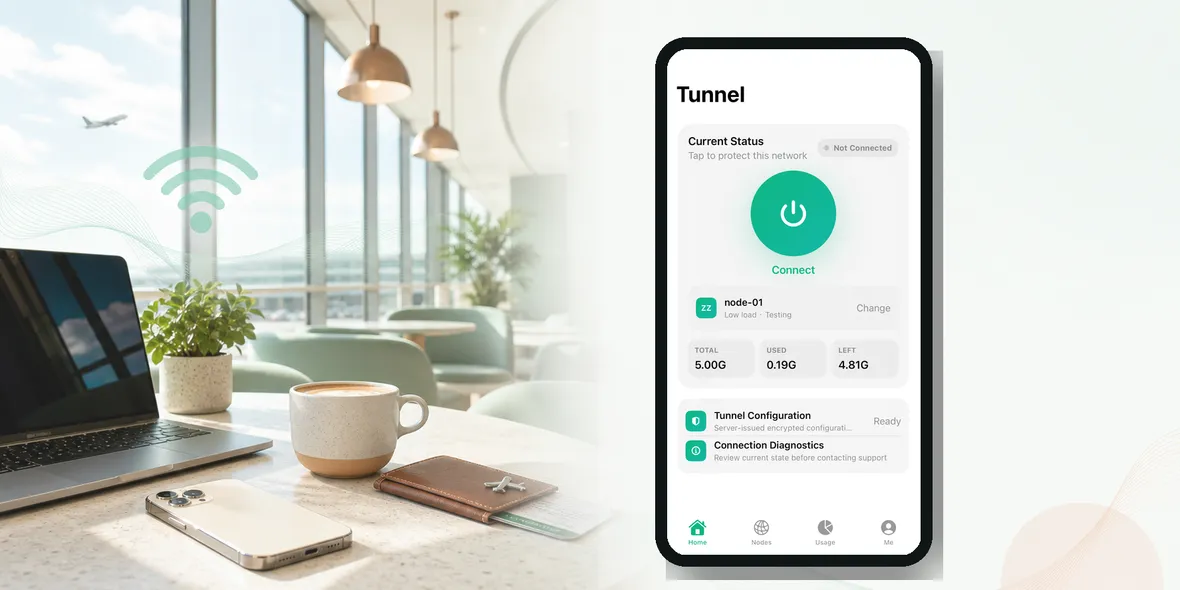
Quick Answer
A simple iPhone VPN should not ask normal users to import unknown profiles, choose confusing protocols, or understand server settings. The safer everyday pattern is download the app, review the privacy explanation, connect before personal browsing, and check usage clearly.
Best For
Search Intent
The reader wants an iPhone VPN that works without complicated setup.
Shareable Angle
The best VPN setup is the one normal people can remember in an airport line.
The answer is not only about features. It is about whether a normal iPhone user can understand the product before relying on it.
Many users skip VPNs because setup sounds technical. They do not want server menus, confusing terms, or long configuration screens when they are standing in an airport.
Why This Feature Matters
VPNs can feel invisible. You tap connect, something happens in the background, and then you continue browsing. That is exactly why clarity matters. Users should not have to guess what is active, what location they selected, how much usage remains, or what privacy statement applies.
A clear product reduces hesitation. If the user understands the app in one minute, they are more likely to use it at the moment it matters: before browsing on public Wi-Fi.
What A Good VPN Should Make Easy
A good everyday VPN should make these things easy to see or understand:
- Install the app from a trusted source
- Review the privacy explanation
- Connect before opening personal apps
- Check that status is active
- Watch usage if your plan has limits
These details are not decoration. They help users make better decisions in real life, especially when they are traveling, studying, working remotely, or using shared Wi-Fi between tasks.
Where Users Get Let Down
Many VPN products overfocus on big claims and underexplain daily use. That creates confusion.
Watch out for:
- installing random free VPNs
- ignoring permission prompts
- not checking whether connection is active
- believing setup simplicity means total privacy
- using public Wi-Fi before connecting
The problem is not that marketing exists. The problem is when marketing replaces the information users need to choose responsibly.
How This Looks In Real Use
Imagine opening your iPhone in a hotel or airport. You do not want to read a technical manual. You want to know whether the VPN is connected, which location is selected, and whether your current usage is still okay.
That is the kind of product detail that makes a VPN usable, not just impressive on a landing page.
Honest Privacy Wording
Sovatun does not collect browsing history, visited URLs, DNS query details, or raw traffic content. That statement is more useful than broad claims like total anonymity because it tells users what is not collected.
A VPN still does not replace strong passwords, two-factor authentication, careful links, or trustworthy apps. It helps with the connection layer on shared networks.
Where Sovatun Fits
Sovatun focuses on simple iPhone controls, official locations, clear usage, and plain privacy boundaries. It is built for everyday public Wi-Fi moments rather than complicated power-user workflows.
Use Sovatun for one-tap public Wi-Fi browsing.
Bottom Line
The best VPN feature is not always the biggest claim. Often it is the detail that helps a user feel oriented: clear status, clear usage, clear locations, and clear data boundaries.
How This Feature Helps In Daily Use
A feature is only useful if people understand it at the moment they need it. For “How To Set Up A Simple iPhone VPN In One Tap”, the value is not just what the app can technically do. The value is whether a user can make a confident decision quickly.
Think about a traveler in a hotel lobby, a student in a library, or a remote worker in a cafe. They are not reading documentation. They are glancing at the screen and asking: am I connected, what am I using, and can I continue?
That is why Sovatun’s product direction should stay simple. Clear status, clear usage, clear locations, and clear privacy wording reduce hesitation. Users should not feel trapped inside a VPN app they do not understand.
What A User Should Be Able To Tell Immediately
A good iPhone VPN experience should answer these questions fast:
- Is the VPN connected or not?
- Which official location or node am I using?
- How much usage have I used this cycle?
- How much is left?
- What does the service say it does not collect?
If those answers are hidden, the product may feel powerful but not trustworthy.
The Better Brand Promise
The stronger promise is not “we do everything.” The stronger promise is “we explain the important parts clearly.”
Sovatun should keep saying what it actually does: a simple private tunnel for iPhone public Wi-Fi browsing, transparent usage, official locations, and no collection of browsing history, visited URLs, DNS query details, or raw traffic content.
Quick Questions
Do I need to import a VPN configuration into Sovatun?
No. Sovatun is positioned as a download-and-use iPhone VPN with official locations built in, not a tool for importing unknown external VPN profiles.
What should I check before connecting?
Check that the app explains its privacy boundary, shows connection status clearly, uses official locations, and lets you see usage without digging through settings.
Does simple setup mean total privacy?
No. Simple setup helps users connect at the right moment, but a VPN still protects the connection layer rather than every part of privacy.